


AI language tools have changed considerably since ChatGPT first became publicly available. Learners are no longer limited to typing questions into a chatbot. Today, AI can support real-time conversations, pronunciation practice, grammar correction, listening, reading comprehension, personalised exercises, and systematic vocabulary review.
ChatGPT is useful for exploring a language, asking open-ended questions, and simulating conversations. DuoCards complements this with structured AI-powered practice based on the words and phrases you are actively learning.
Used together, these tools can help you understand new language, practise it in context, and remember it over the long term.
Create your personal AI language tutor
Before starting a conversation with an AI tutor, explain what you are learning and how you want it to respond. Include your target language, approximate level, native language, goals, and preferred correction style.
For example:
“I am learning Spanish at B1 level. My native language is English. Speak mainly in Spanish, but explain difficult grammar in English. Correct mistakes that affect meaning immediately, and collect minor mistakes for feedback at the end.”
Clear instructions help ChatGPT adjust its language and feedback to your needs.
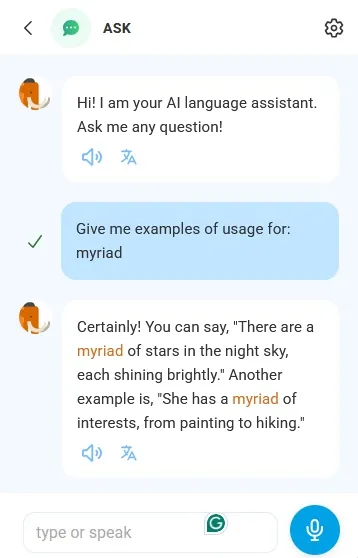
You can also ask questions directly in the Ask section of DuoCards. The AI tutor can explain vocabulary, grammar, usage, and example sentences without requiring you to leave the app. Prepared chat ideas can help you start practising immediately, even when you are not sure what to ask.
Understand grammar and vocabulary
AI can explain grammar rules, compare similar words, and show how expressions change depending on context.
Instead of asking only whether a sentence is correct, request an explanation and additional practice:
“Correct this sentence, explain every change in simple language, and give me three similar sentences to complete on my own.”
In DuoCards, the AI assistant also provides live grammar feedback during a conversation. A green indicator shows that your sentence is correct. When the AI detects a problem, you can open the correction under the bulb icon to see both a revised version and an explanation of what was wrong.
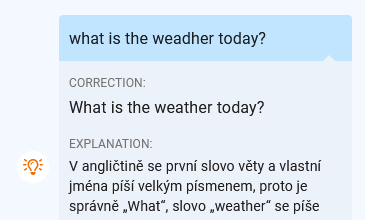
This turns an ordinary chat into active grammar practice and helps you recognise mistakes that you may otherwise repeat.
AI can still overlook a valid alternative or suggest a correction that changes the intended meaning. Check important or surprising answers in a trusted dictionary or grammar reference.
Learn words in context
A translation alone is rarely enough to help you use a new word naturally. Ask AI for its meaning, common collocations, level of formality, and several examples in context.
For example:
“Teach me the German word “Zufall”. Give me a simple German definition, an English translation, five common collocations, three B1 example sentences, and one common learner mistake.”
Save useful words and expressions in DuoCards so that you can review them systematically. Once they are part of your collection, the app can use them in several AI-powered practice activities instead of treating them as an isolated list.
Practise different language skills in one place
A big advantage of our app over ChatGPT is that the AI Practice section offers several types of practice in one place:
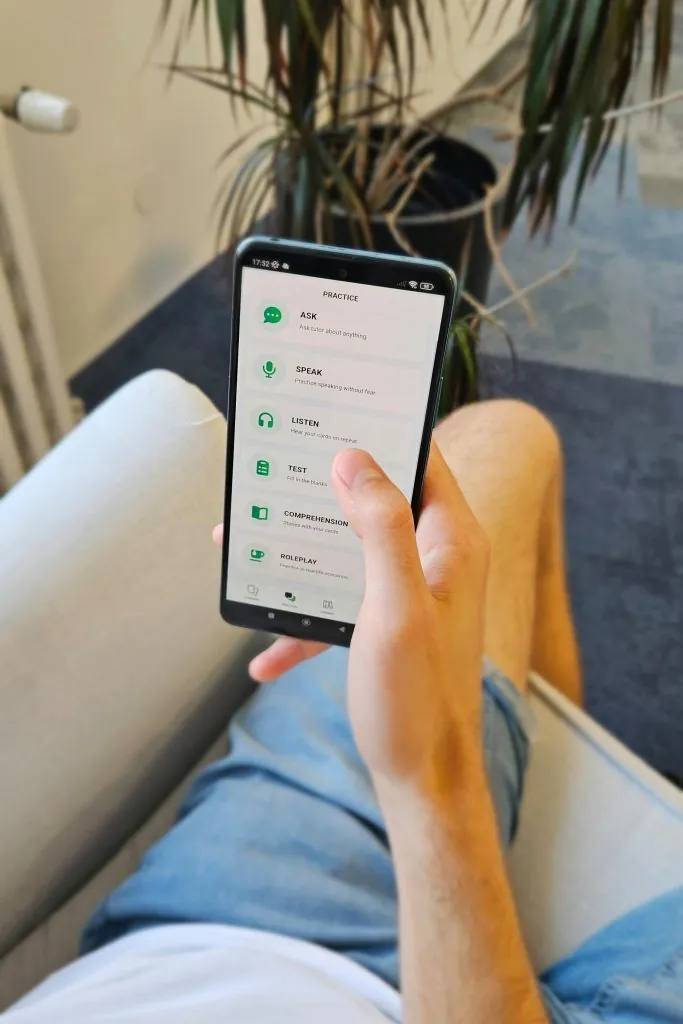
Ask
Ask the AI tutor about vocabulary, grammar, sentence structure, or usage and receive explanations and examples.
Speak
Practise saying words and phrases aloud and receive pronunciation feedback.
Listen
Listen to your cards repeatedly and revise your vocabulary without looking at the screen. This is useful for hands-free practice during everyday activities.
Test
Complete missing words and check whether you can actively recall the vocabulary you have studied.
Comprehension
Read AI-generated stories that include vocabulary from your own cards. This helps you understand how the words are used in context and improves reading comprehension.
Prepare for real-life conversations with roleplay
Roleplay is one of the most practical ways to use AI for language learning.
In ChatGPT, you can create almost any situation with a detailed prompt:
“Act as a waiter in a busy Italian restaurant. I am a B1 learner. Stay in character, ask follow-up questions, and give me feedback only after the roleplay is finished.”
DuoCards offers a more guided alternative in its Roleplay section. You can choose from nine prepared real-life scenarios or create a custom roleplay based on a situation you specifically need to practise.
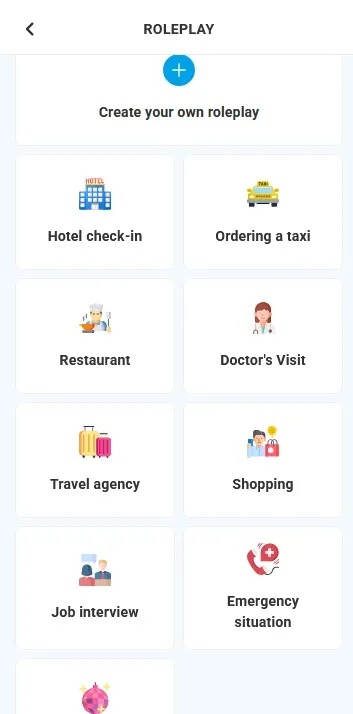
This can help you prepare for situations such as travelling, ordering food, attending an appointment, making a telephone call, or handling a conversation at work.
Prepared scenarios are convenient when you want to start immediately without designing a prompt from scratch.
Improve reading comprehension using your own vocabulary
AI-generated texts are especially useful when they include vocabulary that is relevant to the learner.
The Comprehension section in DuoCards creates stories using words from your own cards. This allows you to encounter familiar vocabulary in connected, meaningful context rather than only as separate flashcards.
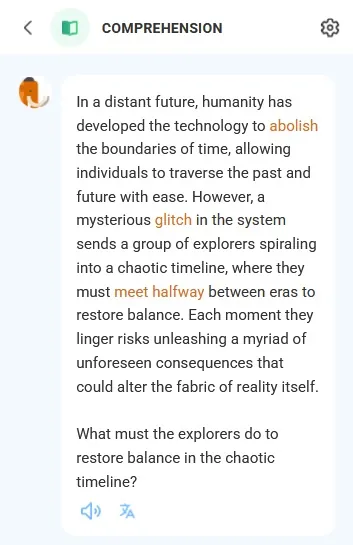
Reading words in a story helps you understand:
- how they interact with other words,
- which grammatical forms are used,
- what kinds of situations they appear in,
- whether you can understand them without seeing a translation.
Because the stories are based on your cards, the practice remains closely connected to your current learning goals.
Get useful writing feedback
You can use ChatGPT to practise emails, essays, messages, stories, or formal documents.
For effective learning, avoid asking it to rewrite everything immediately. Ask it to help you identify your own mistakes first:
“Highlight the parts of my text that may be incorrect or unnatural, but do not correct them yet. Let me try to fix them. Then check my second version and explain my recurring mistakes.”
For shorter conversational writing, DuoCards provides corrections directly inside the AI chat. You can see whether your sentence is correct and open a detailed explanation when a mistake is detected.
This immediate feedback is helpful for practising sentence construction without interrupting the flow of the conversation.
Generate personalised exercises
ChatGPT can create gap-fill exercises, multiple-choice questions, translation tasks, dialogues, and error-correction activities.
For active practice, ask it not to reveal all the answers at once:
“Create a ten-question B1 exercise on English conditionals. Ask me one question at a time, wait for my answer, and explain my mistake before continuing.”
In DuoCards, the Test mode provides structured fill-in-the-blank practice based on your learning material. This makes it easy to check whether you can actively recall words instead of merely recognising them.
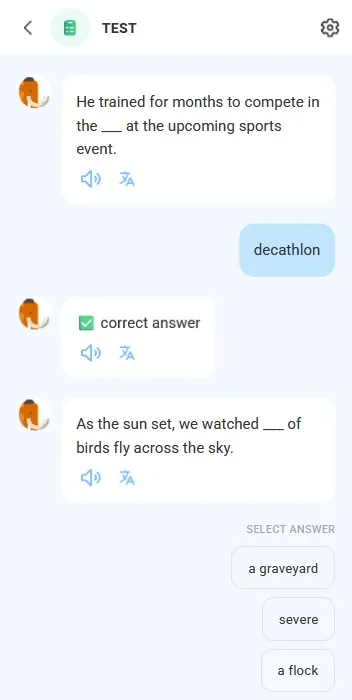
The most effective approach is to combine both:
- use ChatGPT to generate varied explanations and exercises,
- use DuoCards to repeatedly test the vocabulary you need to retain.
Combine flexible AI practice with structured repetition
ChatGPT is particularly useful for exploration. It can explain a difficult phrase, simulate an unusual situation, generate a text, or adapt a conversation to almost any topic.
DuoCards turns what you discover into structured practice. Words and phrases can be reused across pronunciation, listening, tests, comprehension stories, and roleplay.
A practical learning workflow could look like this:
- Ask ChatGPT or the DuoCards AI tutor to explain a new word or grammar point.
- Save useful vocabulary in DuoCards.
- Practise its pronunciation in the Speak section.
- Encounter it in a comprehension story or roleplay.
- Listen to it during hands-free revision.
- Test whether you can recall it.
- Return to an AI conversation and use it actively.
This combination helps bridge the gap between understanding a new expression once and being able to use it naturally later.

Jana is in charge of Customer Support at DuoCards, so she’s usually the one you’ll be in touch with. She holds a Master’s degree in Czech language and literature, which gave her a solid foundation in linguistics and language learning. Over the course of her career, she gained experience in coding websites and managing social media.
When she’s not helping you solve an issue in the app, you can find her hanging upside down on an aerial hammock or with her hands in the soil, taking care of her collection of around 80 houseplants.